Saturday, January 31, 2015

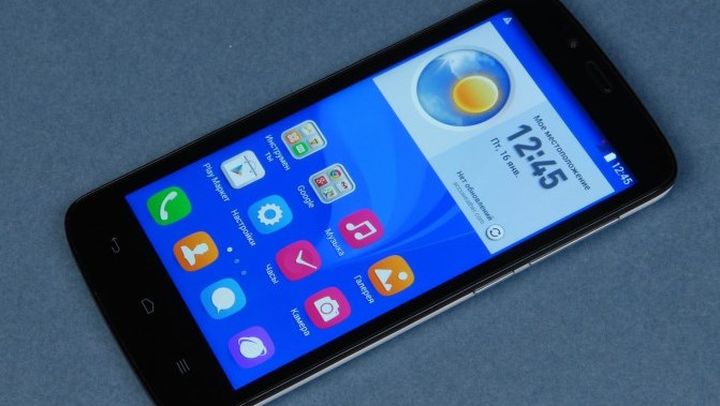
Review of the new smartphone Honor 3C Lite (Holly-U19)

Review of the new smartphone Honor 3C Lite (Holly-U19)


Not so long ago we visited smartphone review Honor 3C , which is generally made us a good impression. Now, however, we received a younger version of this model, called Honor 3C Lite. Let’s see what it can offer users.


Options


Honor 3C Lite comes in a box of turquoise color, which is apart from the smartphone charger with a current of 1 A, USB cable, a wired headset and paper documentation.


Appearance and ease of use


Honor 3C Lite has a pretty standard size for the device with a 5-inch screen. Length is 142 mm, width – 72 mm, and thickness – 9 mm. Because of this, the smartphone is quite convenient to use with one hand.


We were on the review model came with a back cover is white, but there is a version with a black cap. In the first case, it is glossy and matte in the second texture under the skin


If we talk about appearance, the smartphone has a very familiar look. Disappointed with the front side of the device, as looks quite boring.


At its top is a light indicator, light sensor and proximity, the front camera lens and earpiece. Under the 5-inch screen is touch three hardware keys.


Review of the new smartphone Honor 3C Lite (Holly-U19)


Sidewall casing divided almost equally between the frame and the display back cover. Keys and volume control is on the right, they are made of plastic coated with a metal. Above is the 3.5mm audio jack, and bottom – the main microphone jack and microUSB.


On the back of the product facility is located in the main camera with flash and additional basic microphone and speaker. Removing the back cover, we have access to a removable battery capacity of 2000 mAh. And only after removing the battery, we can change the SIM-card format microSIM card and microSD.


In terms of ease of use of the smartphone has been very good. Yes, it is not the most compact, but in everyday use is not affected. Over time, you can get used to the size. Mechanical keys deserve only the forest yet, because clicking on them nice and crisp. But the high-gloss finish and the lack of a removable lid oleophobic coating explicitly added advantage of the device.


Operating system and interface


Honor 3C Lite is running the Android operating system version 4.4.2 KitKat c launcher stylized shell Emotion UI.


Through the use of the launcher, not the shell, the smartphone has an unusual interface. In fact, the interface is strongly reminiscent of Emotion UI, but the blind and the settings menu look like naked Android. Therefore, the merger will not please everyone.


Hardware Platform


Processor smartphone if not old-timer, the exact time-tested – MediaTek MT6582.


It consists of four cores that can operate at a frequency of 1.3 GHz and a graphics accelerator Mali-400 MP. The amount of RAM is 1 GB, from which after turning about 300 MB available. Built-in memory – 16 GB, but you can count on 13.3 GB expandable through memory cards microSD.


Since this is a common processor on performance tests will not elaborate. But it is worth noting that, despite the use of an old chip device afford to run and provide a reasonable number of frames in the zheRealRacing 3. In addition, it is worth noting that in general, the performance of the smartphone is very good. The shell works quite smoothly and quickly.


If we recall that on your smartphone, you can not only play games, but also to communicate, it is necessary to tell about the quality of the voice speaker and microphone. With this devaysa all is well. Of course, the sound of the earpiece is not the cleanest, but it is good enough. But multimedia and high-quality speakerphone, because to miss a call will be quite difficult.


Review of the new smartphone Honor 3C Lite (Holly-U19)


Work wireless interfaces no complaints. Satellites are in seconds, and the communication speed on the Wi-Fivysokaya.


To test the video playback we used benchmarkAnTuTuVideoTester, which eventually issued a predictable result, from which it follows that, for greater certainty, use a third-party player.


Honor 3C Lite is equipped with a battery capacity of 2000 mAh. The active use of the device worked for a little more than a day, with the active screen in 5 hours, 1 hour of calls and it’s a given that the transfer of data across the network was always active. If moderate appetites, then it really count for 2 days of battery life.


Screen


The smartphone features a 5-inch IPS-display with a resolution of 1280×720 pixels. Unfortunately, there is a layer of air between the screen and touch-sensitive surface, and oleophobic coating is absent. Automatic brightness control works well and smoothly. Display behavior on the street is quite good, but we must understand that during testing there were few sunny days.


Camera


Review of the new smartphone Honor 3C Lite (Holly-U19)


Honor 3C Lite is equipped with two cameras, the main 8 megapixel and 2 megapixel front. The main camera can write video resolution of Full HD. In general, the camera application and its capabilities are standard. Present regime HDR, but there is no built-in filters. Settings are very modest.


Results


Review of the new smartphone Honor 3C Lite (Holly-U19)


Honor 3C Lite – a simplified version of the smartphone Honor 3C. The main simplification touched RAM (it decreased from 2 GB to 1 GB), branded envelope and air gap at the screen. It is also worth noting that, despite the use of both devices have the main camera of 8 megapixel older model can take pictures of better quality. But do not forget about the cost of the device. At the time of writing it was estimated at about $ 150 – this is exactly $ 50 cheaper than the older model. Among the competitors is to provide LG D335 L Bello and Microsoft Lumia 535. Both phones are losing the quality of the display, but have a similar price. As a result, the hero of the review is a pretty good choice if budget is limited to the purchase of 150 USD, as for the money you get a device with a good screen, good performance and reasonable running time.


Liked:


+ High-quality screen


+ Sufficient performance


+ Price


Did not like:


- Simplified shell


Review of the new smartphone Honor 3C Lite (Holly-U19)

Lenovo Yoga Tablet 2 Pro review

Lenovo Yoga Tablet 2 Pro review


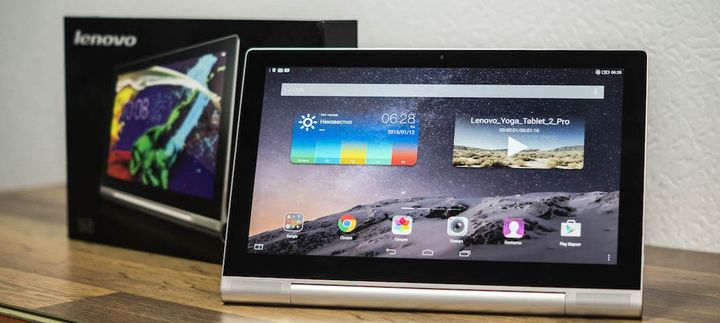
Here is an overview of the tablet from the company Lenovo, which stands an unusual hybrid format, huge 13 “screen and built-in projector. Lenovo Yoga Tablet 2 Pro – met!


In 2013, Lenovo launched the sale of the first tablet with a unique design, it differs from all members of the market by the presence of a special stand that lets you use the tablet in different configurations for different usage models. In October 2014 saw the light of the representative of the entire line flagship, the largest and most tricked – Lenovo Yoga Tablet 2 Pro.


Options


Supplied Lenovo Yoga Tablet 2 Pro pleasantly surprised. In addition to the tablet, in the box you will find a power adapter, USB cable, headphones, JBL, and microfibre cloth to clean the screen.


Design Lenovo Yoga Tablet 2 Pro


The range of Yoga, of course, is a breath of fresh air in the tablet market in terms of design. The presence of unique coasters highlights this tablet among others. Lenovo Yoga Tablet 2 Pro has a nice shape, looks nice, strictly, accurately and original.


Let’s start with the main constructive chips Lenovo Yoga Tablet 2 Pro – stand. Firstly, it allows you to use your tablet in four different positions – a book, a keyboard, and a picture of the console. Secondly, the design has a unique set of the battery cradle, thereby reducing the thickness of the tablet shell. And thirdly, in the thickening complete hiding projector that is capable of outputting image size of 50 “to the wall or any other surface, preferably white.


Lenovo Yoga Tablet 2 Pro review


Large front panel Lenovo Yoga Tablet 2 Pro is conventionally divided into two parts. The top, with black frame and silver trim, along a front camera with a light sensor and a screen that covered by the protective glass. Keys is not here, they traditionally tablet Lenovo, onscreen. At the bottom of the sides are the front stereo speaker from JBL, and the center is a metal adjustable stand.


The right side has contained a microphone, as well as one of the main chip devices – projector, next is a button that turns it on. Located on the left side volume rocker, microUSB input, headphone jack, and a round lock button, which is located in the stand, around her, by the way, is the LED.


The back cover Lenovo Yoga Tablet 2 Pro has a pleasant texture to the touch, which gives the impression of a seemingly resistant to scratches, looks attractive. Located in the center of the logo Lenovo, aside from it is a label that says that this tablet is set processor Intel. From bottom in the convex region is located built-in subwoofer, camera lens, as well as a button that lets you tilt the stand in this area can be found covered with a lid slot for memory card. In the lower left-hand corner are the focus of the projector.


Looking at the complex structure Yoga Tablet Lenovo engineers would like to applaud for the wonderful assembly. The tablet does not flex or creaks, it is assembled with high quality and it felt good.


Ergonomics


Lenovo Yoga Tablet 2 Pro differs from 99% of tablets because of the three parameters – the cylindrical region below, 13 “screen, and the weight of 950 grams. All this is not very good effect on the portable device. Although its characteristics it can be called relatively compact, but in comparison to the plates with smaller diagonals, Yoga Tablet looks giant, after which the 10 “tablet look just tiny.


Because of its size, this tablet is not suitable for everyone and not for all kinds of tasks it will be convenient. Play it uncomfortable, print, despite such a large screen size, too. A lot of fun here gives reading, browsing and watching videos on such a large screen to do it comfortably. By purchasing this tablet, you should know that for convenient use next should be relatively much space. So you can not think about how to use it on the subway or in a lecture where on the table are still pens, notebooks, etc.


Display Lenovo Yoga Tablet 2 Pro


Screen Tablet Lenovo Yoga Tablet 2 Pro is really pleasing to the eye, not only a large screen and high resolution, and excellent color reproduction. The display is moderately rich, natural color, and the picture itself quite clearly. Not very well, perhaps, a representation of black, here it goes gray tones.


Oleophobic coating is very high quality, prints and stains are going not too happy, but if they are still there, for their removal does not have to exert much effort. Viewing angles are not ideal, but at a decent level, the picture is slightly distorted only with a strong slope. Stock average brightness of the device, the winter sun it will not be a big obstacle, but here in the summer on the street is likely to work with the tablet is not very convenient. Interesting, but not quite clear feature is the opportunity to work with the tablet in gloves.


When working with Yoga Tablet, I found two things that I am concerned. The first is that under strong pressure display can go in waves at the edges, and the second is in the sensor, the fact that he sometimes “forgets” to recognize depression, especially if they are going to turn.


All simple program Yoga works smartly and smoothly, etc. With the system elements (opening CO, curtains parameters) sometimes have problems with speed and smoothness. In heavy graphics games offered for low or average in Dead Trigger 2, all works quickly, Asphalt 8 podlagivaet, Real Racing 3 is no problem, but with terrible graphics.


Overall performance is good, but sometimes stumbles tablet, sometimes where from him did not expect.


Autonomy Lenovo Yoga Tablet 2 Pro


Nearly 10,000 mAh is not a joke, but do not expect there some transcendent figures of autonomy, yet there is something to use as much battery capacity. When mixed load tablet will last about a day at a moderate 2-3 days. Hours screen is approximately 4-5 hours. If you use the projector, then the index will be a little less.


Built-in power manager allows a little creative with power to get the best indicators of autonomy.


13-inch tablet, this is probably the most strange device that can take pictures. Despite this, Lenovo has equipped the Yoga Tablet relatively good rear camera. For easy creation of self tablet can be put in console mode, so that during the shooting did not hold on almost kilogram weight of the device. The quality of images on frontalku acceptable, but the movement is easy to lose the detail photos.


Application


Lenovo Yoga Tablet 2 Pro review


Brand application “camera” has a very good position and easy operation. To easily create photo can turn the grid and the level of the horizon. To adjust the recording, you can choose from a number of subjects, manually configure the basic picture settings, white balance, etc.


Sound


Here at this point the full beauty – here you and the front stereo speakers, and a subwoofer from JBl 5W and audio technology Dolby Audio, and Wolfson Master Hi-Fi. Full stuffing, as they say. Sound quality, and a decent amount of depth, an adequate supply of volume and rich sound settings – it all fit in the Lenovo Yoga Tablet 2 Pro.


Separately, I want to tell you about one of the main pieces of the tablet – the projector. As happens in the world of IT, hybrid devices do not always get enough quality, but it can not be said about the hero of our review. The combination of the projector and the tablet turned out really good and useful.


Personally, I almost always watch movies on the laptop, the TV in my room there, and buy a separate projector is not an option. Built-in Yoga Tablet projector has become a very elegant solution – not only that it works longer than conventional portable projectors, so still no noise and is not heated.


In good, for the projection of images onto a wall, you need to put the tablet to “Keyboard”, but due to the nature of the room I could not do that, so I decided to do more interesting. Leaning on a pillow plate, I turned on the projector and the image sent directly to the ceiling. It really looks spectacular when you’re lying on the bed, and on you 50-inch screen, the resolution of the image in this case is 854 x 480.


First of all, I am struck by an updated interface shell from Lenovo – System refreshed, became nicer and a little iOS-like. There is a duality, because sometimes there are beautiful, original icons and sometimes srisovku elements almost 1 to 1 with iOS. Why? I do not know, it does no credit to the designers Lenovo. Do not argue, nice app, but if the user wanted to see iOS, it probably would have bought the iPad, and Android tablet still want to see the applications that are made according to the guideline Google.


Lenovo Yoga Tablet 2 Pro review


Standard launcher, again, pays tribute to iOS, because there is no application menu, all programs and folders scattered on desktops. Launcher, by the way, has a large number of settings, from gestures to intellectual classification icons. Notifications and fast rasbrosany parameters on two different panels that are located above and below, respectively.


Upset that the developers shell is not very much taken care of in order to effectively use a large screen size. Of course, there is a multi-window mode (supports up to 4 applications at the same time), there is even a mode window in the window. The problem is that all of these chips only support 6 standard applications.


To adjust the picture and sound are a special smart panel, depending on the mode you use, it adjusts the color balance and sound mode.


In terms of the stability of the shell shows itself on the positive side, all the time departures applications I did not have, only once has failed desktop, refusing to scroll, the problem was solved reboot.


Accessories


Especially for the hero of our review Lenovo released corporate cover envelope. It has pretty colors, made with high quality and comfortable to hold. Cover cover on the magnet. On the sides are made cutouts for the lock button and the projector. Conveniently, but not always reliable, for example, when the tablet is in a bag with other items I would like to projector is fully protected. Included with the cover are a nice bonus – the film on the display and another cloth to wipe the screen.


Results


Lenovo Yoga Tablet 2 Pro review


Lenovo Yoga Tablet 2 Pro to get the device, where all the attention is focused on the main feature. Large 13″ screen displays high-quality and nice looking picture, stereo speakers crammed with a variety of technologies and work in pairs subwoofer JBL, so that the sound here is excellent, the projector does its job perfectly. In general, all “kilerfichi” work as expected. But not the best optimization software under iron resulted in some problems with performance and smoothness. The shell uses the most mediocre diagonal screen, offering a minimum set of tools for multi-tasking. Standalone device leaves much to be desired, add an hour or two or three of the screen and would have no problems, but 4-6, in my opinion, is not enough.


Tablet 2 Pro – a niche ultimate-device, where all the maximum, but not everyone in this very maximum needs. With its use of this tablet, I would have enjoyed watching movies on it, the task it copes perfectly well. If someone is thinking about this device as a substitute for a laptop, it is not serious, the tablet can not cope with this role. I can not recommend this tablet to the people who often consume media and agree to put up with the large dimensions of the device.


Lenovo Yoga Tablet 2 Pro review

Friday, January 30, 2015

New Glowing headphones Glow pulsate to the music

New Glowing headphones Glow pulsate to the music


Create a brand new headphones now quite difficult – the market has a huge number of different models made for a variety of technologies. However, to bring something new is quite capable of many companies. For example, the creators of headphones Glow not have to reinvent the wheel, altering speaker headphones. Developers simply made glowing headphones.


And the lights and wire, and the headphones themselves. When the music glow pulsing to the beat. Currently, developers raise funds to run the headphones into production, should appear Glow later this year.


By the way, the headphone made luminous by using an optical fiber (typically the material is used for signal transmission, the light beams are converted into electrical signals). Headphones themselves are equipped with five-axis d-pad, which allows without any problems to play music, phone calls and other functions.


Glow – quite practical headphones, with lots of possibilities, and glow – not only their dignity. Glow price is 127 US dollars for pre-order.


New Glowing headphones Glow pulsate to the music

In new Misfit friends with Nest and Spotify

In new Misfit friends with Nest and Spotify


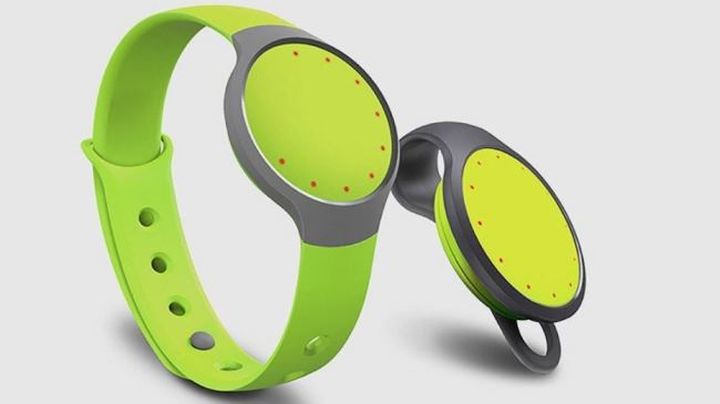
The developers of Misfit added some functions to manage the various elements of the system in smart home tracker Misfit Flash. Even at CES the company unveiled a smart lamp Misfit Bulb, which can be controlled from your tracker. Now to the list of supported devices and added Nest, Spotify, IFTTT, Yo, Logitech.


Misfit Flash users can control various functions of smart devices by double or triple tapas on the touchpad. Thus, the tracker can control the temperature in the house, or work with a playlist of music. Below is a video showing how Misfit Flash allows you to control your home:


Users can use some features of the device at the same time. Probably in the near future developers will add support for other devices in order to be able to using a small tracker control your entire home.


In new Misfit friends with Nest and Spotify

Smart and new Bolt lock controlled from your smartphone

Smart and new Bolt lock controlled from your smartphone


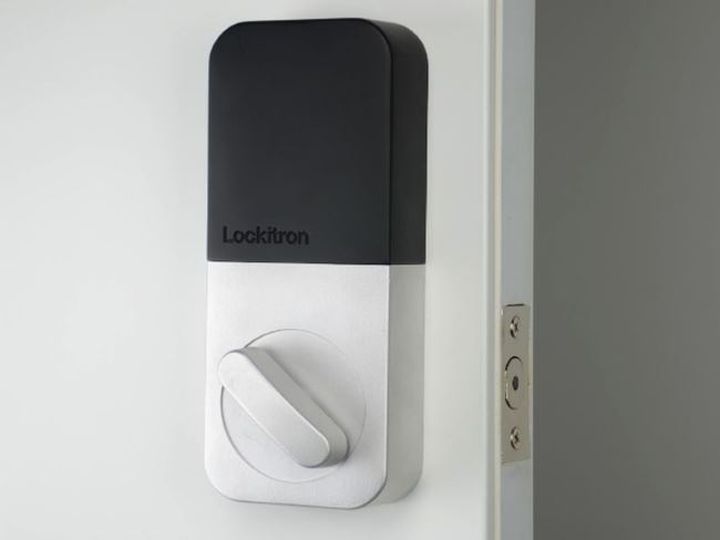
The company began taking pre-orders Lockitron on your smart lock Bolt. This is the second version of the lock, the first was funded as early as 2012, but the company was having difficulty with the production, and not all customers get the device.


Lockitron tries to correct this unpleasant situation, and today it was announced the launch of fundraising for the second version of the intelligent lock. In this case, those customers who pre-order is not the first version, but did not receive the device, this time to get one of the first Bolt.


The device will cost $ 99. According to the developer, smart lock works on the usual basis for many of constipation. But you can control the device from your smartphone to Bluetooth (Bluetooth Low Energy). Bolt is much smaller than the first model of intelligent lock in a functional device includes the possibility of opening and closing the door via Bluetooth. The owners also will be a special virtual key, which can be shared with family members or friends.


Smart and new Bolt lock controlled from your smartphone

Prynt - new Print photos using the shell for your smartphone

New Print Prynt photos using the shell for your smartphone


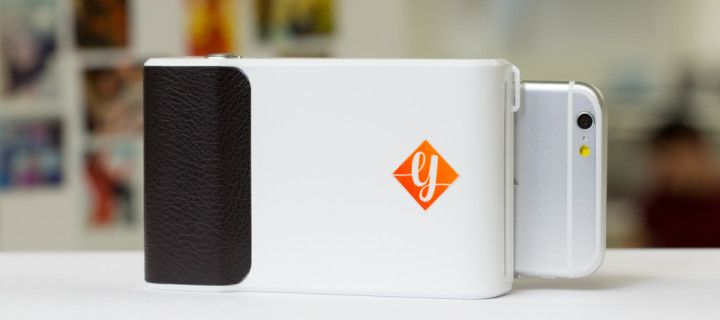
While digital photos are now stored only in online services or on the phone, the specialists of the French startup Prynt decided to plunge into the past and created a body for a smartphone with built-in photo-printer. The invention was announced in November last year. But now it was reported that the device will be available soon. The project is looking for financial support on the website Kickstarter. Prynt for the first half hour scored $ 50,000.


Your photos are transferred from your smartphone to a printer over a wireless connection. The chassis can be loaded simultaneously Prynt up to 10 sheets for printing. Note that the printer prints the images instantly on inkless printing technology. Filling each new cartridge will cost you $ 5. You can print images from your Photo report as well as photos saved from Facebook or Instagram. The selected image can be processed in a special filter.


New Print Prynt photos using the shell for your smartphone


One battery charge is enough for you to print 20 images. Each image will have a size 5 * 7, 5 cm. Therefore, the printed photo, you can attach on the fridge or make small pictures memorable collage. Already raised print photos to the lens on your smartphone, you will see on the video screen, recreated on a picture. The device is compatible with the iPhone 5 / 5S / 5C and 6, as well as the Samsung Galaxy S4, S5.


The cost of this compact printer will be $ 49. The device will be available in blue, pink and white. Retail price for this increase to $ 99. Home sales scheduled for August.


Prynt - new Print photos using the shell for your smartphone

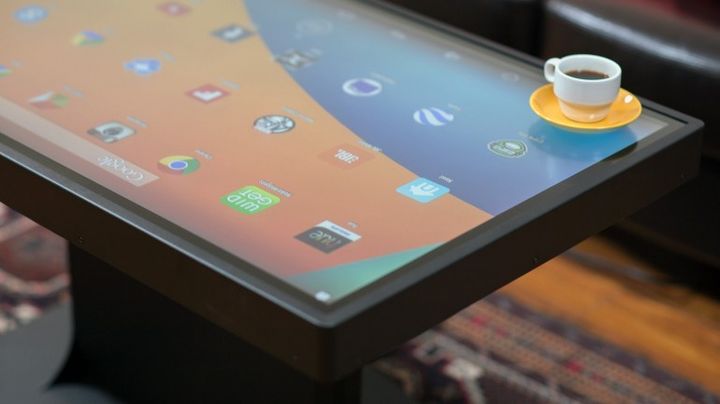
Ideum Duet - «smart» table with Windows 8 and Android

Ideum Duet - «smart» table with Windows 8 and Android


Developers Ideum surprised the world curious novelties before. But now they have surpassed themselves. Company decided to hit the audience today? “Smart” table with a nice “name” Duet.


The device is not only an ordinary Mugmats and correspondence. This is – a powerful computer system with a touch screen format Full HD.


The invention is running two operating systems at once: a full-fledged Windows 8 and mobile Android 4.4 KitKat. Switching between them takes no more than 2 seconds.


What can I say give? Gadget really use like a giant tablet: watch movies, listen to music and enjoy your favorite “portable” games (hello, Clash of Clans).


And when you need it – you can “go” in the operating system from Microsoft. Run “heavy” application with 3D-graphics, edit the document in a familiar working environment.


We should also mention “endurance” design. She collected from reliable materials – cold-rolled steel and aircraft aluminum. Water – thanks to the protection class IP54 – Duet also not afraid.


If we talk about the technical “stuffing”, the decision is arranged pretty clever way. Inside, there are several computational modules.


Ideum Duet - «smart» table with Windows 8 and Android


For an adequate job “OSes” by Google responds Rockchip RK3288 processor clocked at 2.0 GHz. This helps him to 2 GB of RAM and SSD capacity of 16 GB.


With Windows 8, things are more complicated. 42-inch modification Duet offers for the OS from Redmond chip Intel Core i5-4570R, «Outstanding” 3.2 GHz. Plus the graphics core Iris Pro Graphics 5200, 8 GB of RAM and SSD volume to 256 GB.


In 46-inch version of other specifications. He is able to “brag” 16 GB of RAM, Intel Core i7-4710HQ 3.5 GHz, SSD 512 GB and video accelerator GeForce GTX 760 from Nvidia.


Ideum Duet - «smart» table with Windows 8 and Android


In any case, the “brake” will not have to complain.


There was a place even for the increasingly popular nano-PC Intel Edison. It was his “talents” ensure the smooth transition of the program “shells.”


Where Duet useful? Anywhere – in a normal living room, school, museum, library. From the future owner requires quite a bit – a drop of fantasy and 7950 US dollars (for the base model).


Ideum Duet - «smart» table with Windows 8 and Android