Tuesday, July 29, 2014

Nexus 6. Perhaps, Motorola?

Nexus 6. Perhaps, Motorola?


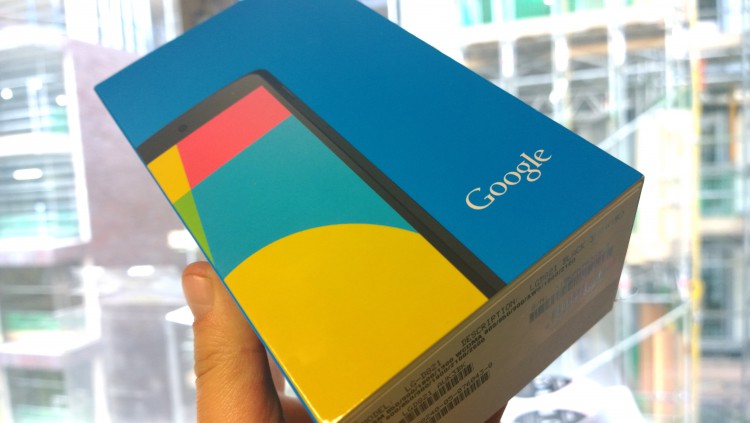
Long time we did not hear anything about the Nexus 6, is not it? We even managed to scare rumors that we will not see new models in this series. Well that it was subsequently disproved employees Google. Strictly speaking, the only thing we know for sure is that the new LG “google phone” will not produce , no matter how well it turned out she had not before. And then who? Perhaps, Motorola.


Rumors about the Nexus 6


According to the information received by the Editor Android Police, Motorola is preparing a 5.9-inch smartphone codenamed Shamu, and while it is all that is known about him. What indicates that this may be exactly Nexus-device?


First, we have already heard the story of that figure in the name of each Nexus does not mean his generation, and the diagonal of the screen (well, or something, and more).


Second, as is well known, apart from official name, and often have a smart code. Nexus line for gadgets codenames selected on the marine theme, in particular, used names of actual fish names or cartoon characters (also fish). A first result in a Google search results for query «Shamu», is an article on Wikipedia, which tells about a very popular in the mid 60-ies of XX century orca, which is exactly what was called. Thus, the device fits directly into the two theories: the code name and the screen diagonal.


If the rumors are true, then we are waiting for the fall 9-inch tablet from HTC and 5.9-inch smartphone from Motorola, both, of course, on the new OS – Android L. However, even the fashion for 5.5-inch screens is sufficient number of disputes about their necessity and convenience, not to mention the almost six inches. Decision, frankly, is contradictory. Nexus 6 will have to compete, for example, a device such as Galaxy Note 3, which has a huge plus in the form of a stylus. Whatever it was, the answers are expected, we get in November.


And you personally interested Nexus with all its advantages, provided a diagonal? Or you do not believe that Google will take such a step? Share your opinion in the comments.


Nexus 6. Perhaps, Motorola?

Monday, July 28, 2014

Laptop review - Lenovo G710

Laptop review - Lenovo G710


Lenovo G budget line includes not only 15.6, but 17-inch models. Performance of such laptop should not wait, but considering the small cost of these devices, and very good functionality, you can, without a doubt, consider the option of such a purchase.


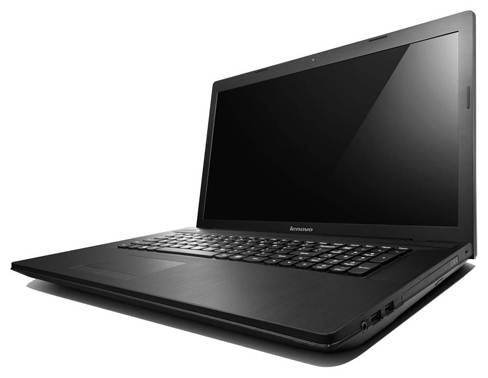
If we talk about the Lenovo G710, which is one of the representatives of the line, then this is the laptop that will be optimal for users who do not have high demands access devices of this kind. Among them are unlikely to be big businessmen or professionals, while at the same time, ordinary office workers, he likely will appeal. Let’s see what the strengths of this laptop, and how much can be justified such an acquisition.


Design - Lenovo G710


The notebook Lenovo G710 simple and attractive at the same time. The body is made of opaque plastic, strongly reminiscent of polished aluminum. He is not quite practical, because on its surface, fingerprints, because of what will often wipe panel. But the construction is solid, the lid does not flex, no creaks. Designers chose unattractive black coloring, however, to draw attention diluted its textured. By the way, the cover itself the logo of the company Lenovo, no other details on the outer surface is not.


Laptop review - Lenovo G710


If we talk about upgrading, then this laptop will not cause any inconvenience. Battery is removed quickly and easily slot on the bottom does not impede access to the modules of RAM and hard disk.


Of course, the 17-inch laptop, by definition, can not be too compact size, and prove that the figures: 418x278x36.6 mm. If we add to this unit’s weight 2.9 kg, it is unlikely to be a secret that this laptop does not turn too often carry. At the same time, we can say that the Lenovo G710 is very cumbersome.


Display, audio, webcam - Lenovo G710


Laptop screen is large enough, it has diagonal size 17.3 inches and a resolution of 1600×900 pixels. For work that is enough, because on such a display can be freely disclosed to place two windows application. By the way, watching movies also bring discomfort, except that you have to adjust to slightly glossy surface, but rather the inevitable glare. At the same time you get a bonus in the form of rich colors and high contrast (about 1100:1). As for the brightness level, it does not exceed 260 cd/m2, which, in principle, fine for most tasks.


Laptop review - Lenovo G710


Screen visibility is typical for a standard TN-matrix. So much fail vertical viewing angles – even a small deviation begin severely distorted colors. With horizontal much easier inversion occurs only if too deviate from the straight position.


Laptop review - Lenovo G710


Webcam laptop has a pretty low resolution 1 megapixel, so count on the chat in Skype and nothing more. If we talk about acoustics, the Lenovo G710 has two stereo speakers and support for Dolby Advanced Audio. While listening to music will be heard loud and relatively clean sound, so that is not to blame for that.


Keyboard and Touchpad - Lenovo G710


Laptop equipped with an island keyboard AccuType with relatively large buttons. The main keys are complemented by a digital unit, which also has a normal size.


Laptop review - Lenovo G710


We can not say that the keyboard is in the ideal, because makes itself felt fuzzy returns each time, as well as deflections during an intense set.


Laptop review - Lenovo G710


As for the touchpad, it is made in the traditional style, ie ends with two physical buttons. By the way, the buttons work pretty hard, but to touch the site itself does not have to get used to because your fingers glide over the surface without delay, and excellent sensor responds to any touch. It is worth noting that the pad is slightly shifted leftward from the center, but discomfort during operation it does not.


Laptop review - Lenovo G710


Performance - Lenovo G710


In the Lenovo IdeaPad G710 (59-410795) no pre-installed operating system. And this can not be called a complete set of the most powerful. So, with the calculations here copes dual-core processor with Intel Pentium 3550M 2.3 GHz and third level cache 2 MB. It is built on 22-nanometer technology, but, unfortunately, does not support Turbo Boost technology and Hyper-Threading. Besides the power consumption of the chip is not too low, it is 37 watts. Haswell processor will not be able to provide high performance, however, for simple everyday tasks such as web surfing, video playback, of course, typing his power enough.


Laptop review - Lenovo G710


Do not count on high-quality graphics processing, despite the fact that there is installed integrated graphics Intel HD Graphics (Haswell) and discrete NVIDIA GeForce GT 820M. Built-in accelerator supports DirectX 11.1, well decodes video, and performance, in comparison with the Intel HD (Ivy Bridge), looks more advantageous. However, with him you should not rely on resource-intensive applications and many new games. Special rates are not worth doing, and on the second card – GeForce GT 820M, which has 2 GB of memory DDR3 memory and supports DirectX 11. Certainly, it is better integrated HD Graphics, but refers to the primary level, and hence is not too strong to confidently handle with complex calculations. However, you can use it to play Call of Duty: Ghosts at medium settings with a resolution of 1366×768 pixels (25-26 fps) or Batman: Arkham Origins (32-33 fps). Same F1 race in 2013 could go free on high settings with HD-resolution of more than 45 frames per second.


Good support system performance can be regarded as 4 GB of RAM standard DDR3-1600 MHz. For there are two RAM slots, so you can expand the amount of memory by installing strips in the second free module, for example, up to 8 GB or 12 GB. Data can be stored on the hard drive capacity of 1 TB. That’s enough, even if the owner except documentation plans to create multimedia collection.


Ports and Communications - Lenovo G710


Interfaces laptop occupy the edges. Left taken power socket, VGA, HDMI and one USB 3.0 standard. In addition, there is a card reader SD / MMC and network RJ-45 port. But on the right side is two USB 2.0, Kensington lock slot and a combined audio jack for microphone and headphones. The main part of this face takes an integrated optical drive DVD Super Multi with support for Double Layer.


Laptop review - Lenovo G710


Laptop review - Lenovo G710


Of wireless communications provides Wi-Fi 802.11 b / g / n, Bluetooth 4.0 – in general, a standard set that can be found in almost every laptop. The only thing that Wi-Fi transmitter is not too fast, he catches a good signal only when it is close enough to the access point.


Battery - Lenovo G710


Of course, Lenovo G710 laptop can work not only on the network, but also from the battery. It stands 6-Cell Lithium-Ion Battery 4400 mAh (48 Wh). For a balanced regime of its charge lasts up to five hours. This, though not a good result, but not the worst.


Conclusion - Lenovo G710


This laptop certainly can recommend to buy, but it is better not too demanding users, because apart pros and cons found here. For example, the processing power is not always enough for demanding tasks, and the display will not be pleased wide viewing angles. At the same time, 1TB hard drive – a godsend for those who are going to store a lot of files, and a robust housing and a decent autonomy allow Lenovo G710 regarded as an acceptable option for infrequent, but perhaps necessary trips. If we add a comfortable keyboard, the required set of ports and a built-in optical drive, it turns out that the purchase of such laptop solve many problems, including financial, for the purchase does not exceed the threshold of $ 600.


Laptop review - Lenovo G710

Smartphone review - Huawei Ascend P7

Smartphone review - Huawei Ascend P7


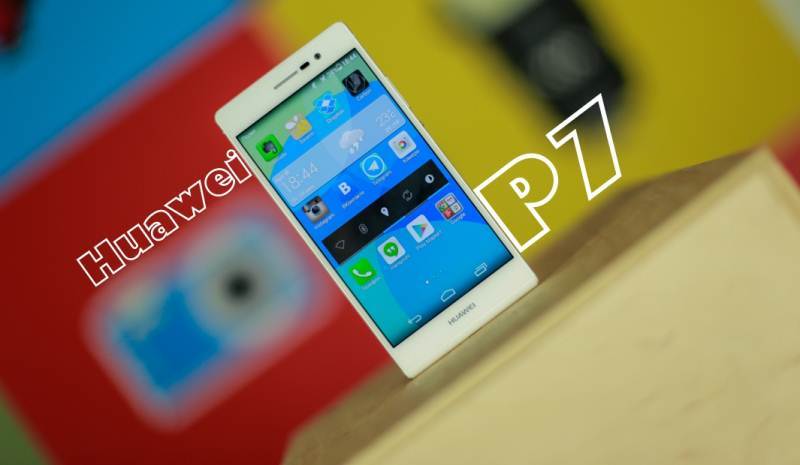
Oh, this Huawei! I guess I’ll never stop defame their name and repeating that “Huawei” to the person applying is not desirable. But anyway, sometimes they turn out decent stuff. One of these just in my hands – Huawei Ascend P7. No wonder that the company celebrated July 2 million units of supply to the world market. And this is a half months after the release. For comparison, the supply of its predecessor, Huawei P6 , for the time amounted to 4,000,000 units. So the company has all the prerequisites to beat their own records.


Design - Huawei Ascend P7


Smartphone review - Huawei Ascend P7


One can not ignore the continuity series devices from last year’s flagship P. hero of our review can distinguish only the man who faced both devices. At first glance, Huawei Ascend P7 - slightly longer version of P6 . In fact the same differences a little more. The back cover glass now and “spotted”, and the speaker a little altered and deployed vertically (by the way, he became noticeably louder); connector for charging and headset finally found its rightful place (on the P6 connector for charging on the top and 3.5mm headphone jack was in the bottom left side of that, as you know, quite uncomfortable in Huawei Ascend P7 classical location: Headset – on, for charging – bottom: there is a less significant changes – for example, sensors moved to the right of the earpiece, which itself became a little less, and above it is now LED-indicator, lock button became round and is located closer to the center , optional microphone shifted slightly to the right.


Smartphone review - Huawei Ascend P7


The main body is made of glass, aluminum side frames with plastic edging, and the lower part – from plastic that traditionally rounded. Some do not like it, but it seems to me that, had the same face as the top, would be a very “Hello iPhone”. The one “round now” lock button is lower than we would like. It’s small, it is difficult to get, and instead of a block I often make the volume quieter, and this after two weeks as the primary device. In addition, under this plastic “plug” hiding the second antenna and plastic making it as efficient as possible.


Smartphone review - Huawei Ascend P7


Huawei Ascend P7 is available in two body colors – black and white, pale pink, apparently, decided to refuse. Since the body does not understand, all two card slots brought to the right edge of the casing. At first it may seem that dual-sim Huawei Ascend P7, but Huawei has made the top slot for memory cards, at least for our countries. Although with P6 was the same story, but now it is sold in dvuhsimochny embodiment, in conjunction with the “Intertelekoma”. In China, for example, a slot for MicroSD double and, if necessary, work with SIM-cards. Only inconvenient that slots do not differ from each other in size, and two weeks each time you change the memory card I first took out the sim card.


Smartphone review - Huawei Ascend P7


Front has 8 megapixel camera, light sensors and proximity, earpiece, LED-notifier and an impressive 5-inch display. Patterns on the rear panel to hide fingerprints, the panel is composed of seven different layers, it seems that this gives it additional strength. Both sides of the device are protected Gorilla Glass 3.


Smartphone review - Huawei Ascend P7


Huawei Ascend P7 In general, it is the same the world’s thinnest smartphone, and that P6 . Formally different thickness – 6.18 mm vs. 6.5 mm on the eye as this difference is not visible at all. This gives the user? I will say this was the day when I had to cram three smartphone pockets of his jeans, and so, I put Huawei Ascend P7 and Nexus 4 in one pocket, “sandwiches”, and did not feel that I have there two phones. I, of course, are not as tight pants, like seeds, but do not say that there are huge pockets. And, of course, after any other smartphone felt puffy.


Display - Huawei Ascend P7


Smartphone review - Huawei Ascend P7


The most striking difference from its predecessor – the display. Despite the fact that the angles got a little worse, and slightly below the maximum brightness, the overall impression from the operation of a lot better. Here it is not that steep, it is very steep. This 5-inch IPS-matrix with FullHD-resolution (1920 x 1080 resolution, 440 ppi). Not only that, it takes up almost the entire front portion, so also the complete absence of air gap is doing its job. Out of the box chilly display that can easily be corrected in the settings. The display has excellent anti-glare properties and very effective oleophobic (grease repellent) coating. Auto Brightness adaptive, which means that you should set the slider to a satisfactory value for you, and the automatic mode will proceed from your preset. The maximum brightness is sufficient for working in the sun, and the minimum – for dark rooms. Color inversion when no deviation, however, they slightly dim, which was not in P6 . Black color slightly lightish, but without a direct comparison is not noticeable. The display is made ​​of technology In-Cell , which reduced the thickness of 0.44 mm on a smartphone because the touch sensor is built into the color filters, and not a separate layer. First Technology In-Cell has been implemented in LG Optimus G . Supports work gloves. In general, the display can be considered if not the same, somewhat similar in quality to the reference Nexus 7 (2013) , but it’s worth it.


Camera - Huawei Ascend P7


Huawei Ascend P7 equipped with two cameras, which are different from those used previously. The front camera has a record resolution of 8 MP and takes pictures with a maximum resolution of 1836 x 3264 and video shoots with 1080 p (maximum aperture – f2, 4). Huawei is now offering to take panoramic selfie, that fans can enjoy this business. Unfortunately, there is no function of tap-to-focus, so sometimes you can get Rasfokus. But you can do selfie by voice command, danced tap on any part of the screen or buttons to adjust the volume. The main thing – do not forget to set the shooting mode to all 8 MP, since by default it takes 6.


The same must be done with the basic 13-megapixel camera that shoots out of the box 10. It has image sensor Sony BSI CMOS fourth generation and lens with a maximum aperture of f2, 0. Here it has autofocus, as well as LED-flash. After iPhone 5s became fashionable to say that the outbreak Simplex.


Smartphone review - Huawei Ascend P7


On the main camera can do a quick snapshot of the locked state: double-click on the volume down button in the lock mode. Pictures are for 1.3-1.4 seconds, which is fast enough for such a function. Standard mode shooting in cells such as ridiculous as shooting with reduced megapixels or shooting in HD-resolution instead FullHD. He called clever, but in fact just zamylivaet frames especially evident when shooting on the front camera. I do not find a way to do a photo while shooting video, so most likely this is not available. HDR mode works for video, but the photo quality is poor.


Smartphone review - Huawei Ascend P7


In general, the pictures are not so bad. Given that in my hands a test sample can be expected to improve the program in the final version. Sometimes small problems get accustomed with the sharpness (images at the edges), but the noise reduction is good. At least, the quality of the photos is enough to kropnutyh them instagrama and normally handle. Do not forget how this compact optics.


Performance, autonomy and software - Huawei Ascend P7


Filling here exactly the same as in the Huawei MediaPad X1, – quad-core HiSilicon Kirin 910, running at a clock frequency of 1.8 GHz (manufacture Huawei), the chipset supports LTE-network technology and NFC. Responsible for the graphics display adapter Mali-450MP, device 2 GB of RAM and 16 GB hard drive. Huawei Ascend P7 works quickly, some troll is there, but the internets write that in the final version of the device of this kind all bugs eliminated. And here they are not significant, and only when the “complex” animation desktops. Nevertheless, even with the test sample, I was pleased to work with. Challenges and games run “Hurrah.” Heating devices are not significant in comparison with other modern smartphones. The company says it is thanks to a special gel inside, which prevents heat and reduces power consumption.


Smartphone review - Huawei Ascend P7


Device battery – 2500 mAh. AnTuTu Tester heavily updated, and compare the results with those made earlier tests other smartphones hardly succeed. But with Huawei P6 I compared. Bottom line: 5073 vs 7717 at current flagship. In the previous model assumed autonomy above average, so at P7 it is really high. But drop the dry figures. I really paid attention to autonomy when forgot to include it into the net for the night, he “ate” a couple of percent. I used all day smartphone in its normal mode. As a result, the next morning I still have 54% charge, and I reached him until the evening. Battery life – 37.5 hours, and there is still 10%, for which there is a special mode that increases the autonomy of the half.


Autonomy is really impressive. We must pay tribute saving system: once a capacious application is in the background, as reported by phone, and the application can be closed with one touch. There are 3 modes of energy consumption: Normal (for games and online video); Smart (for everyday use) and energy saving (for salvation). Quite accurately predicted remaining battery life, and you will realize that it is useful when confronted. The only problem – too fast charge out watching the video, but even if you watch the video transport when traveling around the city, you can still not worry about the charge. Full-charge time, a little over 3 hours.


I believe that Huawei proved to everyone that a large display with FullHD resolution, not a reason to reduce the battery life.


Smartphone review - Huawei Ascend P7


Android 4.4.2 is installed on top of the shell sobvstvennogo production – Emotion UI 2.3. By comparison with it, version 1.6, mounted on Huawei P6 , can be called Depressive UI. Indeed, since the work was carried out with the shell is colossal. All cleaned up: icons, menus, settings. Heaven and earth. Usually we buy the phone and disable all the “bells and whistles” from producer. Here nothing more I found. I liked that the lock screen wallpaper changes every time you turn on the display, at what time they are repeated with increasingly rare and therefore loaded with new ones. Still here goes blind from below, as in iOS 7. Like that you can select an animation navigation desktops, though it was before. Added a “simple” design style, which is slightly reminiscent of Windows Phone, but still pretty and well suited to the older generation, or as a mode “in the car.” Generally funny that Huawei in simple mode similar to the basic mode in WP. Mode appeared “Do Not Disturb” Notification Manager, the button control and a section of the “Movement”, which can be configured on the mechanical response of the device action. In the “Authorized Applications” you can choose the ones that will be run in the background after hibernation. In general, over the sheath specific job, which is only Power Save system, which I described above.


A few words about the sound in the headphones. He became worse than its predecessor, but not significantly. This comes from the fact that the manufacturer refused to Dolby Mobile technology in favor of DTS. Nevertheless, the device is still a pleasure to use as a player, especially after the terrible in this regard Nexus 4 . Sound from main speaker loud and clear, no complaints.


Output - Huawei Ascend P7


Smartphone review - Huawei Ascend P7


The smartphone has not great. And this is his problem. This company can not claim great success in this segment as people are clearly not willing to give $ 450 for Huawei. And I do not speak for the first time that the Russian-speaking market, companies will only brand adaptation (local name change). The reasons may be threefold: in China do not know about “euphony” names in our countries; the company simply can not afford such a strong move; or the worst – the company believes that the brand Huawei has great strength and a long history. A smartphone is a really cool, I enjoyed using it. Separately to emphasize autonomy and display. Issue price – $ 470.


Smartphone review - Huawei Ascend P7

Sunday, July 27, 2014

Review Wexler Tab 8q: two SIM-cards eight inches

Review Wexler Tab 8q


Tablet, concurrently working telephone, long been no surprises. Another device Budget Wexler received from not only the phone function, but also the opportunity to work with two SIM-cards, both with support for 3G. While Wexler Tab 8q – not the typical smartped, and a full eight-inch tablet. The rest of his familiar characteristics: resolution of 1024×768 pixels, quad MediaTek MT8382 1,3 GHz and 5 megapixel camera. Let’s see what it looks like in practice.


Package and Accessories - Wexler Tab 8q


The tablet is packed in a good box of hard plastic, traditionally Manufacturer white, minimalist and with the same “big-eyed” logo Wexler. Packaging, perhaps even elegant, it can be considered a gift.


Review Wexler Tab 8q


Under the hood – packed in a soft foam pad, a short instruction and charger with USB cable in a separate box.


Appearance - Wexler Tab 8q


Review Wexler Tab 8q


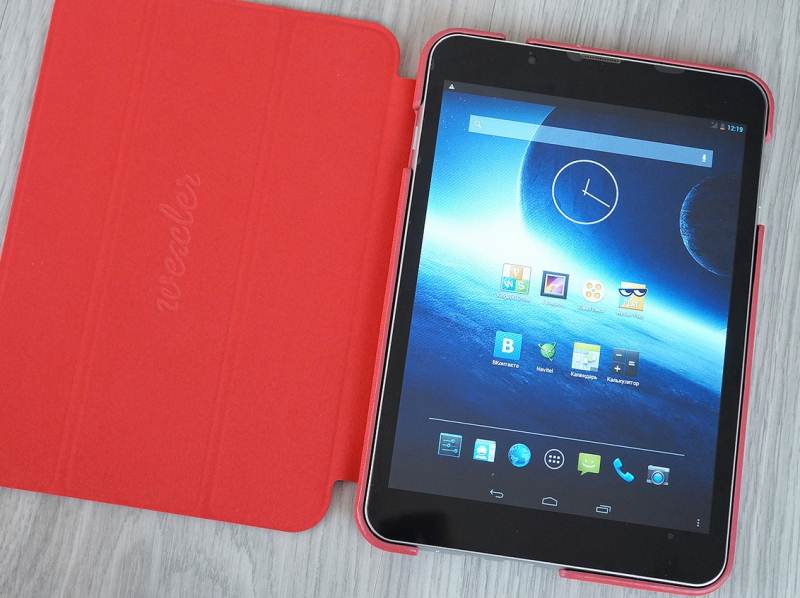
Appearance at Wexler Tab 8q simple enough. Glass front panel and the plastic back plate painted framed by the metal rim. Dimensions of the device are 202 x 138 x 9 mm, and its weight – 380 grams.


Located on the front facing camera is shifted slightly to the left, and above it is placed in the center of the earpiece. Around the screen – small black frame.


Taken out volume rocker on the right side, and on / off button – on the left.


Review Wexler Tab 8q


At the lower end of the body fit microphone, micro-USB connector and socket miniHDMI. At the top there is a headphone jack.


Part of the rear panel – removable, which is a rarity for tablets. Below the top of the back cover hidden connectors for SIM-card and the memory card slot microSDHC.


Review Wexler Tab 8q


The main camera is moved to the left corner of the panel, it is located under the flash. Logo Wexler, also supported on the cover, flipped vertically and read in landscape mode.


The rear panel has an interesting “pixel” texture. However, since plastic mat, it is evident only in the light.


Review Wexler Tab 8q


Assembled plate well without backlash, compressive body is not pressed. It looks solidly and reliably, and in the hands felt the same way. Conspicuous plastic edging, but expect design budget unit does not have a real metal.


Ergonomics - Wexler Tab 8q


The tablet weighs 380 grams, which is quite noticeable for this diagonal. However, the relative weighty work with him comfortable: it is still possible to effortlessly keep on weight, plus in his hand he is fine and does not slip. Except that you can find fault with the buttons – I would like them to be harder.


Review Wexler Tab 8q


Cover plate rather reluctantly leaves his place, and in no hurry to get back, not snapping into the grooves. SIM-card, too easy to insert, remove, they are a bit stuck in the sockets, so you have to refrain from frequent change “simok” or microSD.


Screen - Wexler Tab 8q


Tablet was glossy capacitive display with a diagonal of 7.85 inches, made by technology TFT IPS and coated with a protective glass. Screen resolution was 1024×768 pixels, and the number of pixels per inch – 163.


Screen color reproduction is good, except that the black color is not enough depth. Display brightness is not ideal: the midday sun to see the image difficult. But for indoor and outdoor lighting in cloudy weather with enough headroom. Viewing angles are not a record, but very decent. In addition, the screen is not easily soiled and almost no glare.


Sensor detects up to five simultaneous touches and in most cases does not slow in recognizing gestures. Display settings let you change the font size from small to huge.


Review Wexler Tab 8q


As for the pixelation inevitable in such density – in small letters you can see the pixels, of course. But the picture is clear, color-rich, and in the amount of screen though not enough stars in the sky, but makes a good impression.


Interface - Wexler Tab 8q


Operating system Wexler Tab 8q is “pure” Android 4.2. In addition to the standard set of applications, the user is invited to corporate Wexler Play – directory for quick installation of the most popular and useful tools, from e-readers to customers of social networks. This is not a standalone installer application links lead to pages of applications in Google Play. But this seemingly simple program greatly facilitates and accelerates the acquisition of necessary software device, allowing not waste time looking for it in Google Play.


Review Wexler Tab 8q


The interface works smoothly, but clicking on the onscreen keyboard responds thoughtfully, hampering typing.


Unit in the - Wexler Tab 8q


Processor Wexler Tab 8q – MediaTek MT8382 quad 1.3GHz. Responsible for the graphics performance Mali-400 graphics accelerator MP2.


Benchmark AnTuTu Wexler Tab 8q scored 15,333 points. At 3DMark tablet showed the following result: 2878 points in Ice Storm, 1932 in Ice Storme Extreme and finally in the 2829 Ice Storm Unlimited.


Review Wexler Tab 8q


Tablet supports smooth operation of most games. Minion Rush executed with a slight slow down, Dead Trigger 2 went almost without a hitch. With Angry Birds tablet coped without question. Racing simulator Asphalt 8 did not go perfectly, but allow normal play within. In general, do not require Wexler Tab 8q smooth operation in all 3D-games, but if you do not quibble too much and puts minimal setup – can live.


From watching videos 720p devaysa no problems, but it demonstrates 1080p video with mild shortness of breath. All staff applications work stably. Absolutely can not do without brakes, but overall the tablet is not peculiar reverie.


One external speaker, which is located and does not overlap with any grip. Sound good loud. It is not that deep or particularly clean, but quality – within comfortable listening. Voiced game or movie is perceived perfectly happy good stock volume.


Camera - Wexler Tab 8q


Camera, which is typical for this segment of the devices, the tablet was not very serious, rather average. The main module is equipped with a 5 megapixel flash, autofocus and takes pictures in the resolution of 2560×1920 pixels.


Review Wexler Tab 8q


Pictures can not be called bad – they are decent, but there are problems with the clarity and autofocus sometimes works slowly. In this survey itself is fast, the application starts smartly. The colors in the photos are good, but move out in purple.


Review Wexler Tab 8q


You can make a panorama or sharpen mode using HDR. Last better not turn off, as in the normal mode, the camera illuminates the sky either, or takes some of the plans in the blackness, HDR same situation improves.


Pictures with the front camera, though sin aberrations, but look decent, the image is suitable for “self”, and Skype.


The tablet is able to shoot video. Obtained fairly smooth rollers with a good sound.


Wireless interfaces - Wexler Tab 8q


The tablet is interesting because it can work as a mobile phone, so even with two SIM-cards. He also has a module 3G, Wi-Fi 802.11n, Wi-Fi Direct and Bluetooth 4.0.


Wi-Fi tablet “catchy” flawlessly with Bluetooth-enabled devices mates also without question. 3G, calls and SMS – all excellent and fast. Proved convenient to call (though with a headset still much better!) Network problems during use was not, except in places where the signal is weak in itself.


Autonomy - Wexler Tab 8q


Device is equipped with a battery capacity of 4000 mAh. In sleep mode uses almost no charge, per day lost more than 10%. Screen seems also quite economical. The largest share of the charge goes to a network connection and Wi-Fi, so that if you disable the wireless interfaces we get very energozhivuchy gadget. Even with the active use of the tablet safely hold the entire working day, it is realistic to go with him and 2-3 days. This is his unambiguous plus.


Review Wexler Tab 8q


Video playback (maximum brightness) Wexler Tab 8q lasted about seven hours. An hour of game – take the most demanding – spent about 15% charge. In short, in this part of the device is also no slouch.


Autonomy tablet certainly pleased: this device – one of those that you can forget in a bag for a couple of days without having to worry about charging.


Results - Wexler Tab 8q


If you do not get hung up on some thoughtful interface in front of us – great budget eight-inch tablet (the price of the device is 200$). Among peers Wexler Tab 8q allocates 3G support and the ability to work in phone mode with two SIM-cards, as well as a very good autonomy.


Pros Wexler Tab 8q:


  • support 3G;

  • convenient realization of the “telephone” component;

  • good autonomy.

Cons Wexler Tab 8q:


  • not very convenient to change the SIM-card.


Review Wexler Tab 8q: two SIM-cards eight inches

Saturday, July 26, 2014

Review Nikon AF-S DX Nikkor 18-55mm F3.5-5.6G VR II

Review Nikon AF-S DX Nikkor 18-55mm F3.5-5.6G VR II


Nikon has always been known for its famous glass. Moreover, even the whale, low-end models they were very, very good, offering the best picture quality for those who have just stepped into the path of photography.


But, it seems logical that you can not stand still, because even the most successful solutions will simply expire and lose the competition.


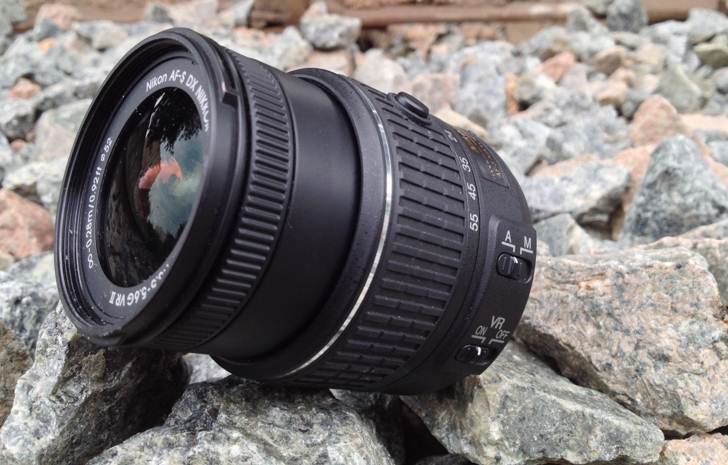
Compact lens Nikon AF-S DX Nikkor 18-55 F3.5-5.6G VR II


So Nikon decided to release an updated version of its whale lens – compact Nikon AF-S DX Nikkor 18-55 F3.5-5.6G VR II


First look at the sliding lens – and comes to an understanding that it is, nevertheless, a whale. Cheap Inexpensive plastic, small backlash, plastic mount – all this gives the representative of the budget class.


The lens itself is very compact in the folded form. Centered the wheel is mounted with rubber coating that is responsible for zooming. It is here ustavnovlena button lens opening – you clamp it cranked wheel zoom towards longer focal length lens and translation in a working condition. Directly at the edge of the lens is another wheel covered ribbed plastic. This control element responsible for manual focus and say that it is inconvenient and counterintuitive – to say nothing.


Review Nikon AF-S DX Nikkor 18-55mm F3.5-5.6G VR II


Besides all this on the case and there are two levers – to switch between manual and auto focus and enable / disable the optical stub.


Autofocus – moderately fast, although not hit records. Focusing takes place correctly and clearly, false passages least they occur mainly at night.


Stabilization system works surprisingly well. At the focal distance of 55mm can shoot with hands on exposures up to 1/10s, which is approximately three-stop slower than usual.


Sharpness on the maximum aperture and the short end – good on the edges and slightly nedotyagivaet to “Excellent” in the center of the frame. Cover the aperture to F8 improves, so that all the edges and the center values ​​are above the level of “Excellent.” On the value of F11 indicators are compared with the maximum open aperture followed by a proportional decrease.


Zooming to 35mm demonstrates “Excellent” only on the values ​​of F8 and F11, all other aperture range from “Good” to “Excellent.”


Review Nikon AF-S DX Nikkor 18-55mm F3.5-5.6G VR II


55mm sharpness not shine. Meaning of ‘Excellent’ is achieved only in the middle F11, and then – rather formality. On all other apertures – all-just “good”, approaching it to the top, then to the bottom of the range mark.


Chromatic aberration can create a big problem only when shooting at the maximum aperture is closed at minimum focus distance. Values ​​reach two pixels, so I have to look for stray color pixels manually in the editor. But at 35 and 55mm values ​​- no more pixels at F22, so deal with it and intracameral editor.


Review Nikon AF-S DX Nikkor 18-55mm F3.5-5.6G VR II


Vignetting – quite expected deffekt for whale lens. At maximum aperture at 18mm focal distance fall brightness at the edges and you caneasily notice the naked eye, so you should be covered though, would be a couple of stops working or studying in the editor. But on the long end even with open aperture vignette is not so noticeable, but for reassurance worth hide behind.


But the level of distortions pleasantly surprised. Deviation of vertical lines is not that out, but the eyes do not hurt. In this case you can always hide behind at a stop or two to fix this thing ve installing a tick in the editor.


Alternative - Nikon AF-S DX Nikkor 18-55 F3.5-5.6G VR II


If you still decide to buy the lens separately from the body, you need an inexpensive and versatile lens – worth a look towards the Sigma AF 18-125mm F3.5-5.6 DC OS HSM. In addition to a much greater range of focal lengths, a good build and image quality it offers more and metal mount that is undoubtedly a very big plus, especially for people who are not sitting still. And all this – for $ 170.


Tamron AF 18-200mm F3.5-6.3 XR Di II LD Asph (IF) Macro has already cost more expensive – 300 bucks. But then there’s more extended range of focal lengths and existents macro – wide universalism.


Total - Nikon AF-S DX Nikkor 18-55 F3.5-5.6G VR II


The cost of this lens – about $ 150. And, besides the price, it has a lot of good – low level of defects and good sharpness, great job stabilization system. But the plastic mount and build quality make consider buying this lens separately. But in a whale for a beginner – the perfect choice.


Review Nikon AF-S DX Nikkor 18-55mm F3.5-5.6G VR II

Review Asus Zenfone 5: in harmony with the world

Review Asus Zenfone 5


Zen Buddhists revere as the most direct experience of the correct way of understanding the world. And we, in turn, take this approach and test Asus Zenfone 5 –  “Zen-background” – in practice. Will the Zen know its HD-screen, Intel Atom processor and 8-megapixel camera – we meditate on it in the review.


Inside the small black box in which to reach Asus Zenfone 5, we found packed in cellophane smartphone application instructions and warranty card, charger, USB cable and headphones headset.


Review Asus Zenfone 5


To look at the headset is not particularly impressive, but in fact gives a very deep, albeit slightly hollow sound with decent bass. Perfect sound proofing in the ears headphones fit like a glove. They also attached two pairs of ear cushions of different size.


Appearance Asus Zenfone 5


Review Asus Zenfone 5


Asus Zenfone 5 looks very interesting. Average cost 7500 rubles usually does not involve sophisticated design, but in this case we are dealing with an exception to the rule.


Photographs on smartphone black, but he also produced in white, red and gold colors.


Verge of a rectangular body slightly beveled at the bottom of the front panel – an interesting metal insert with radial grinding. The rest of the panel is covered with glass Corning Gorilla Glass 3. Under the screen are bright button “back”, “home” and “menu”, they are not equipped with lighting, but can be seen in the dark.


Review Asus Zenfone 5


Above the screen – silver logo Asus, shifted to the right-facing camera, and next to it, a light sensor. The logo is silver earpiece grill.


MicroUSB connector is on the bottom side of the device.


Review Asus Zenfone 5


Metal on / off button and volume changes are located on the right side of the smartphone also got texture radial grinding. Would like to see the buttons were a bit harder, but it’s from the subjective feelings.


At the upper end of the smartphone imposed 3.5mm jack and the microphone hole.


Review Asus Zenfone 5


We proceed to the rear of the unit – here we see a bit recessed compared to cover the main camera, which is located under the flash and another manufacturer’s logo. External speaker pronounced in the lower part of the panel.


Some design elements very recognizable by the industry, but, as they say, “any accidental coincidences.” In any case, this does not deprive Zenfone unique charm of simplicity and quality materials.


Ergonomics Asus Zenfone 5


Diagonal five inches longer seems neither big nor small. In arm rests smartphone excellent tactile feel of soft-touch surface on the back cover – the most pleasant. Velvety plastic bit collects fingerprints, but they are easily cleaned.


Review Asus Zenfone 5


Thin, lightweight, fits the hand – form factor very devaysa has to ensure that they enjoy as often as possible.


The cap is removed easily and gets very tight in place. No gaps, cracks and so on in the body is not, it is perfectly assembled. In general, to use a very handy gadget.


Screen Asus Zenfone 5


Five-inch IPS-display Asus Zenfone 5 We were pleasantly surprised and in some ways even struck. Maybe it’s the cutscenes and well-chosen fonts, but at first glance it seems that the screen has a resolution of not less than FullHD, although in fact it 720×1280.


Review Asus Zenfone 5


Just peering into the small text and detail, you will notice the pixels, so the image is clear and smooth. Color reproduction is also great.


Incidentally, the company established a smartphone app to calibrate the screen, where you can move the sliders color temperature, hue and color saturation by adjusting the screen for yourself. In our subjective view of the default settings look best, but the taste and color of all the markers are different, and the possibility of flexible individual calibration – it’s always a plus.


On the bright sun screen starts to go blind, but in general it is bright and almost no glare. Automatic brightness adjustment, by the way, always works quickly and gently, then display “pass.”


Touchpad that recognizes up to five simultaneous touches, has good sensitivity and easily copes with gestures. A GloveTouch technology further enhances the sensitivity and allow you to interact with the gadget gloves. In the Russian winter, this function will certainly be appreciated.


In general, the fault is almost impossible to anything (except for behavior in the sun), but there are many reasons to praise – very high accuracy, flexible settings, sensitivity, and, of course, color rendition.


Interface Asus Zenfone 5


Top of the operating system Android 4.3 on Asus Zenfone 5 installed proprietary shell ZenUI. For its appearance characteristic variety of color, lots of rounded corners, tiled and a minimalist application icons.


Zen UI is very well developed in terms of design, and despite the explicit reference to the interface familiar to other smartphones, perceived and looks good – impressed fonts, animations, pleasing color combinations and adorable icons. Works too well: the system does not always responds instantly, but differs in the general smoothness and lack of significant braking and lockups.


Separately, you can say about the appearance of such banal things like dialer. It seems to be a trifle, but it is used very often and beautiful design “dialer” certainly pleasing to the eye. The same can be said about the SMS. The built-in keyboard is attached a series of numbers, so there is no need to switch back and forth when dialing numbers.


Among the pre-installed on Asus Zenfone 5 programs in a separate folder contains common application from Google – does Chrome, Maps, Gmail, Google+ and so on.


Established group branded apps ZenLink, the principle of which is based on the use of Bluetooth.


PC Link allows you to display an image from your smartphone on the wireless screen; Remote Link transforms your smartphone into a remote control the PC; and Share Link – it’s just something like a client to transfer files via Bluetooth.


Other brand utility delivered in a separate folder. In our case, this is a lovely reminder organizer-Do It Later, where you can drive to-do lists by category, and, for example, we have already mentioned the screen calibrator Splendid.


Has its own configuration wizard power saving modes, which, depending on the prevailing type of activity is supposed to switch to phone mode, music, games or watching movies. This should be useful for those who can, for example, for a long time to hang in the game during a trip on the subway, or to save charging while watching a movie.


In SuperNote curious can now create handwritten notes – the text should be written in a special window, and then he is automatically reduced and grouped by line.


There are other “native” applications, including fun gadgets like Mirrors, simply outputting the screen image with the front camera, but to dwell on them, and we will not move on to the next item on our review.


Performance Asus Zenfone 5


Asus Zenfone 5 is based on a dual-core Intel Atom Z2580 processor with a frequency of 2 GHz and a graphics accelerator PowerVr SGX544MP2. We got the version with 16 GB of internal memory and 1 GB of RAM.


Web surfing, social networking, reading – for this and similar household tasks Asus Zenfone 5 fits perfectly. Only sometimes with slow scrolling, the image moves with a twitch, but it does not occur regularly and may be more related to the optimization of specific applications.


Browser starts to slow down at the seventh-eighth tab. 720 and 1080p videos played back smoothly. Dialer, SMS, contacts and almost all utility work is not satisfactory and the slightest braking.


Lightweight body and a five-inch screen for gaming, so we decided to check the performance of our experimental games. We started with a simple but fun toy Cut The Rope 2, and with her Asus ZenFone 5 decides not that great – great.


Very good and went smoothly Dead Trigger 2, but there have been rare hitch, the same was with Minion Rush, which generally went smoothly, but with slight braking.


In racing simulator Asphalt 8 and if we are faced with hitches, they were minor and did not affect the gameplay. In general, with regard to the smoothness of the animation, Asus Zenfone 5 shows himself a good solid four.


Now for the cons: the more or less serious load – in this case, 1080p video games and heavy – housing Asus Zenfone 5 heats. In the course of the game Asphalt 8 body temperature increased after the first race passed us.


In the synthetic tests Asus Zenfone 5 showed relatively good results and rating devices AnTuTu caught between Samsung Galaxy Note 2 and Samsung Galaxy S3 with a score of 19351.


To summarize: the operating system and basic utilities work “Hurrah” smartphone cope with heavy pages on the Internet and most of the games, including heavy, but under heavy load begins to heat up.


Camera Asus Zenfone 5


The main 8 megapixel camera has a flash and autofocus and takes pictures size 3264×2448 points.


Camera app provides many opportunities for customization. Also manually change white balance, ISO and exposure, you can enable protection against jitter regime change focus from automatic to “infinity”, and set the volume key on the descent or simply touching the screen. Also there is a self-timer 2, 5 and 10 seconds.


Review Asus Zenfone 5


Now go through the shooting modes, among them but the most that neither is a standard HDR and panorama is a very, very unusual, such as the mode of “Thumbnail” artificially blurry frame around the composite center. Shape blur, you can choose a circular or linear. The result is not in all cases successfully, but it’s fun and sometimes spectacularly.


I’m fine with smartphone Macro: You can shoot almost close, the camera pulls out the smallest details and fine – certainly in the context of mobile photos – blurs the background. In this case, the pictures speak for themselves.


Review Asus Zenfone 5


Example macro with artificial lighting.


Pictures are very clear, detailed, without any noise and error auto exposure.


One of the major chip camera – Low Light Mode Low Light Mode. Not without noisy and blurry shots, but overall a decent night shot with natural colors.


Finally – panoramic pictures.


And the test movie to show you the features of the camcorder.


We have a two-megapixel devaysa front camera. Stars in the sky, it is not enough, but makes relatively clear and legible images.


Wireless interfaces Asus Zenfone 5


Review Asus Zenfone 5


Asus Zenfone 5 got two slots for “Sims” both – size microSIM. Smartphone good catches mobile network quickly clings to Wi-Fi; problems when a signal is detected during testing Wi-Fi, GPS, 3G and Bluetooth we did not have to face. GPS is working properly, so you can use the device as a navigator. More smartphone supports Miracast, so that it can connect to a wireless screen and broadcast it on the image with the gadget.


Autonomy Asus Zenfone 5


When the battery capacity 2050 mAh special vitality Asus Zenfone 5 can not boast. Nevertheless, 1-2 working days – depending on how exactly to use it – smartphone missing. We lived it full time, and in the evening there were still 30% percent – it provided a permanent job 3G, frequent calls, occasionally reading twitter and the like. By standby mode no complaints, per night phone loses 3-5% charge.


Review Asus Zenfone 5


Video playback smartphone discharged for 4-5 hours. Serious games consuming about 20% charge per hour. In general, it is not the best performance, it is necessary either to carry the charger with you, or to save the battery, giving up playing games, watching videos and other energy-intensive processes.


Results Asus Zenfone 5


Do not know, how about learning Zen, but got a nice smartphone: screen quality, lightweight and slim body, good camera, in the end, beautiful interface. Of course, there are disadvantages, for example, heating under a load. But its value – and the average price for Asus Zenfone 5 is 200$- a gadget to be very balanced and, simply put, the best.


Pros Asus Zenfone 5:


  • good camera

  • variety of software

  • clear screen.

Cons Asus Zenfone 5:


  • sometimes heated,

  • not the highest autonomy.


Review Asus Zenfone 5: in harmony with the world